
TABLE OF CONTENTS
- Before You Start
- Allow Home Assistant to Be Embedded
- Add Your Home Assistant Dashboard to the TouchHub
- Frequently Asked Questions
- Why Does the Home Assistant App Show a Blank Page or a Refused to Connect Message?
- Why Did It Stop Working After I Updated Home Assistant?
- Why Can't I Type My Home Assistant Login on the Display?
- What Address Do I Enter for Home Assistant?
- Can I Change How My Dashboard Looks in the TouchHub?
- Do I Still Need to Use the Home Assistant Blocks on My Custom Screens?
- Helpful Articles
The Home Assistant app in the TouchHub shows your own Home Assistant (HA) dashboard (also called Lovelace) full screen on your DAKboard Display, so you can see and control your smart home from it. It looks exactly like your dashboard does in a web browser, and you can switch back to your Screens at any time from the dock at the bottom. The Home Assistant app is available on every plan, including the Free Subscription.
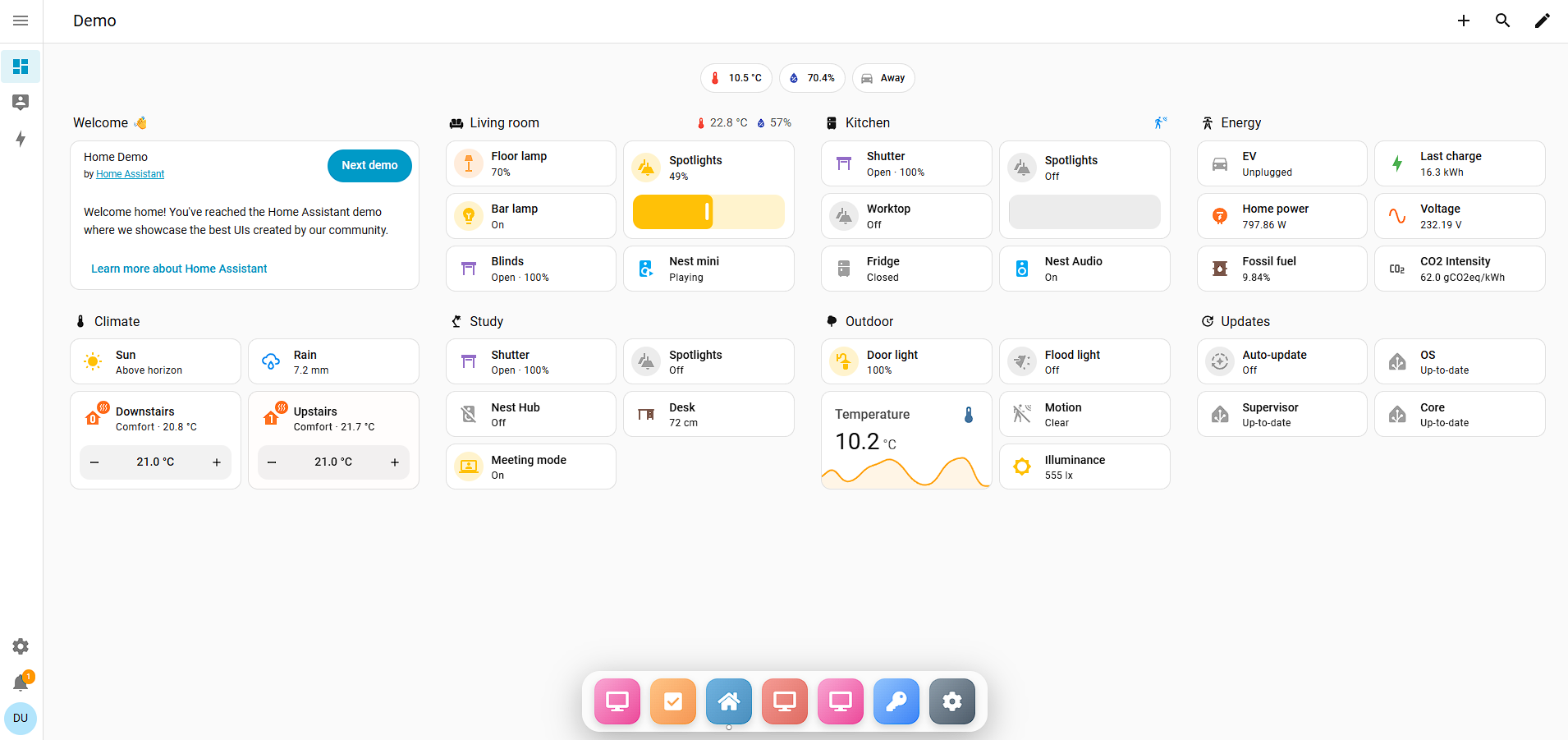
Setting it up takes three steps: make sure your Display is ready, allow Home Assistant to be embedded, and add your dashboard address to the TouchHub.
Before You Start:
- A Home Assistant dashboard. If you have not set one up yet, see Home Assistant: Dashboards.
- Your Home Assistant address, the one you use to open Home Assistant in a web browser on your home network (for example, http://192.168.1.100:8123). Include the port, if your address has one.
- A Home Assistant administrator login, to change the setting below.
- DAKOS 4.14 or later (recommended). On DAKOS older than 4.14, you need a USB keyboard and mouse connected to your DAKOS device to type your Home Assistant login. From 4.14, you can use our on-screen keyboard. See Upgrading Your DAKOS Device to learn which device you have and how to upgrade it.
Allow Home Assistant to Be Embedded:
For security, Home Assistant blocks other websites, including DAKboard, from showing it inside their pages. It does this by sending a setting called X-Frame-Options. To show your dashboard in the TouchHub, you need to turn this off once.
How you do this depends on your Home Assistant version. To check it, go to Settings > About in Home Assistant. Use Method 1 for 2026.8 and newer, or Method 2 for older versions.
Method 1: Home Assistant 2026.8 and Newer:
From Home Assistant 2026.8, this setting is in the Home Assistant settings, so you no longer need to edit any files.
- In Home Assistant, go to Settings > System > Network.
- In the HTTP server section, open More options.
- Turn off Send X-Frame-Options.
- Click Save. Home Assistant restarts.
- When Home Assistant asks you to confirm the new settings, confirm them. If you do not confirm within 5 minutes, Home Assistant goes back to the previous settings.
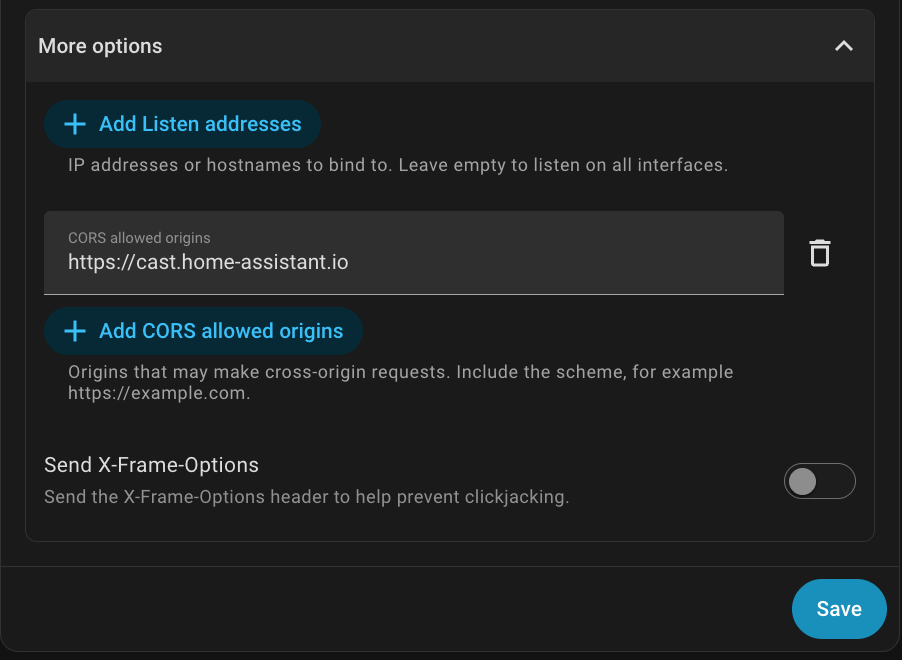
Already used Method 2 before updating? When you updated to 2026.8, Home Assistant copied your setting into this screen and showed a message asking you to remove the http: section from your configuration.yaml file. Check that Send X-Frame-Options is off, then remove the http: section and restart Home Assistant. The configuration.yaml method stops working in Home Assistant 2027.2.
To learn more, see Home Assistant: HTTP settings.
Method 2: Home Assistant Older Than 2026.8:
On versions older than 2026.8, the setting is in your Home Assistant configuration.yaml file. See Home Assistant: The configuration.yaml file to learn how to find and edit it.
By default, Home Assistant sends this setting:
X-Frame-Options: SAMEORIGIN
This stops your dashboard from showing inside other websites, like DAKboard. To change it, add the following to the http: section of your configuration.yaml file (or add the section if it is not there):
http:
  use_x_frame_options: false
Setting use_x_frame_options: false turns the setting off, so your dashboard can be shown in the TouchHub. After making the change:
- Save configuration.yaml.
- Restart Home Assistant (a full restart, not just a reload).
- Add your dashboard address to the TouchHub (see Add Your Home Assistant Dashboard to the TouchHub).
Updating Home Assistant soon? After you update to 2026.8 or newer, follow Method 1 to check the setting and remove the http: section.
Security Considerations:
Turning off X-Frame-Options allows your Home Assistant dashboard to be shown inside any website, not just DAKboard. Ways to keep Home Assistant secure are available on the Home Assistant Community and in the Home Assistant FAQ.
Add Your Home Assistant Dashboard to the TouchHub:
- Add the Home Assistant app to your dock. See Select Items to Add in our article The TouchHub.
- In Dock Configuration, click Edit on the Home Assistant item to open the Customize Dock Item window.
- In Home Assistant URL, enter the address of your Home Assistant dashboard, for example http://192.168.1.100:8123. Include the port, if your address has one.
- If you like, change the Display Name, Background Color, and Icon for the item.
- Click Save Changes.
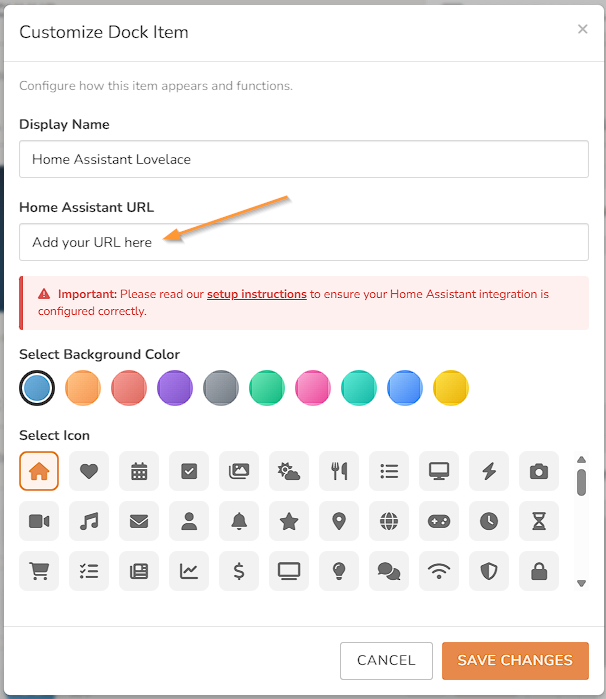
Address tips: the address must start with http:// or https://, and it must not include a username or password. You log in to Home Assistant on the Display itself.
Frequently Asked Questions:
Below are the most frequently asked questions about the Home Assistant app in the TouchHub.
Why Does the Home Assistant App Show a Blank Page or a Refused to Connect Message?
Why this happens: Home Assistant is still blocking other websites from showing it, or the address is not correct.
How to fix it:
- Check the method for your Home Assistant version in Allow Home Assistant to Be Embedded. For Method 1, make sure you confirmed the change within 5 minutes. For Method 2, make sure you did a full restart.
- Open the same address in a web browser on a computer on your home network. If it does not open there, correct the address in the TouchHub.
- Make sure your Display is on the same network as Home Assistant.
Why Did It Stop Working After I Updated Home Assistant?
Why this happens: From Home Assistant 2026.8, the setting moved from the configuration.yaml file to the Home Assistant settings, and the configuration.yaml method stops working in Home Assistant 2027.2.
How to fix it: Follow Method 1 to check that Send X-Frame-Options is off, then remove the http: section from your configuration.yaml file and restart Home Assistant.
Why Can't I Type My Home Assistant Login on the Display?
Why this happens: DAKOS versions older than 4.14 do not have our updated on-screen keyboard.
How to fix it: Connect a USB keyboard and mouse to your DAKOS device to log in, or upgrade DAKOS with Upgrading Your DAKOS Device.
What Address Do I Enter for Home Assistant?
Use the address you use to open Home Assistant in a web browser on your home network, for example http://192.168.1.100:8123. Include the port (the number after the colon), if your address has one.
Can I Change How My Dashboard Looks in the TouchHub?
Yes, in Home Assistant. The TouchHub shows your dashboard exactly as Home Assistant displays it, so any changes you make to your dashboard in Home Assistant show in the TouchHub too. DAKboard cannot change how it looks, and you cannot add DAKboard Blocks to it. See Home Assistant: Dashboards to learn how to customize your dashboard.
Do I Still Need to Use the Home Assistant Blocks on My Custom Screens?
The Home Assistant app lets you fully control Home Assistant without the Home Assistant Blocks. To show Home Assistant information on your Custom Screens, you can still use the Home Assistant Blocks. See How to Add Home Assistant to DAKboard Custom Screen to learn more.
Helpful Articles:
Having trouble? See if these articles help.
How to Add Home Assistant to DAKboard Custom Screen