
TABLE OF CONTENTS
DAKboard Shop Tax Exempt Setup:
Please note that the Tax Exemption does not extend to our Resellers. Please contact them to confirm whether tax is applied or if they support Tax Exemption.
DAKboard Subscription Tax Exempt Setup:
Currently, DAKboard collects taxes for users in the US and the EU. The tax exemption process is slightly different between our US and our EU customers. This portion of the article will explain what you need to do to get your tax-exempt status.
For all New Customers:
When setting up your Paid Subscription for the first time, you will have the opportunity to add your US Employer Identification Number (EIN) or your Value-Added Tax (VAT) number. When selecting your Country, the Tax ID (optional) section will appear. See below:
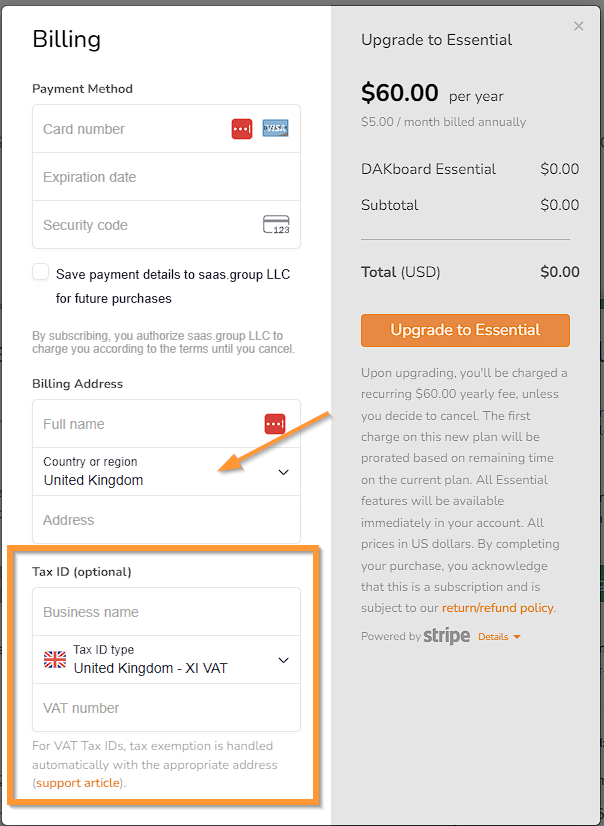
For all of our EU customers, as long as you provide your Business Name and the correct VAT ID, you will be automatically enrolled for tax exemption. For US-based customers, you will need to add your Company's EIN, then reach out to our Support Team through our Chatbot to supply the additional information in the section below. To do this, click on the Chat Icon in the lower right corner, and type Create Support Ticket to have the AI Chatbot assist you in making your ticket.
For US and Existing Customers:
If you have already created an account and now need to add your exempt status, or you are a US-based company and have supplied us with your US EIN at sign-up, we will need to complete the steps for you to apply your exemption status. To do this, your subscription will need to be started before we can apply the exemption status. Then, update the ticket you opened with the required information below:
- Account Username
- Tax Exempt forms (Where Applicable)
- Your US EIN or EU VAT number
- Any details needed to be included in your Invoice, like corporation names and addresses.
When sending us your forms, if there is any missing data, we will let you know right away. If you are a US business, make sure you supply this to us before the end of your Trial period, as we will not be able to refund you for Taxes Charged.
Frequently Asked Questions:
Below are the most Frequently Asked Questions about the Tax Exemptions:
Can I add my Tax ID when I sign up if I am not in the US or EU?
Yes, if the option appears when you select your country, you can add your Tax information at that time. You can do this even if we do not collect taxes for your country.
Will my tax-exempt status automatically apply when I add my Tax ID at sign up?
For countries in the EU using VAT numbers, yes, the status will automatically apply when validations are completed. For US entities, we need to manually set you to exempt, so you must supply us with the details mentioned in the For US and Existing Customers section above. If you are from a country we do not collect taxes on, if that state changes and you have already entered your Tax ID, we may have to manually add the exempt status. We will send notifications when we add new countries to our Tax list so that you can reach out and let us know if your ID is in place.